
Why should I clear cache, cookies, and browsing history?
Knowing how to clear cache, cookies, and browsing history is an important part of maintaining your internet privacy. It can also help keep your ad blocker working as intended. Why do we suggest clearing your browser cache and cookies, resetting your browser settings, or updating your browser when you're seeing unblocked ads?
-
Your browser cache may retain information from a previous visit to a website with ads. If you delete the cache, they can no longer load.
-
A website may have created cookies on your computer that interfere with ad blocking.
-
Malware can change your browser settings to keep your ad blocker from working.
-
Browsers sometimes have bugs that make it difficult to block ads properly. Updating your browser ensures it has any recent bug fixes.
How to clear your browser cache and cookies
Firefox
-
Click the Library button in the upper right-hand corner of the browser, select History, then select Clear Recent History.
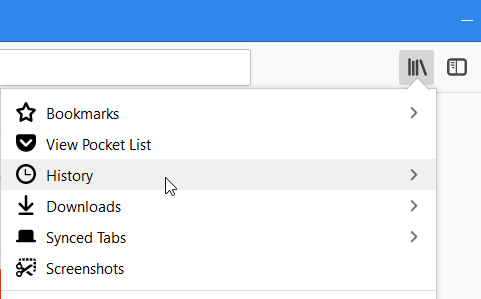
-
Select the time frame and which data you want to clear then click OK.
Reset your browser settings
Do this only if clearing your cache and cookies doesn't fix the issue.
Warning: Be sure to back up your saved passwords and bookmarks first! If you're not sure how, search for "backup saved passwords and bookmarks [your browser name]" in your favorite search engine, replacing "[your browser name]" with your browser as appropriate.
Update your browser